Keyword Research
Find the phrases people might use to discover your business, and learn how to choose a useful topic from the results.
The tool opens in your Kwordia account. Dotted links explain terms in the glossary.
Before you begin
Keyword research is a way to learn the language your audience uses when searching. A keyword can be a whole phrase, not just one word. This page helps you turn a broad subject into ideas for product pages, articles, or answers to common questions.
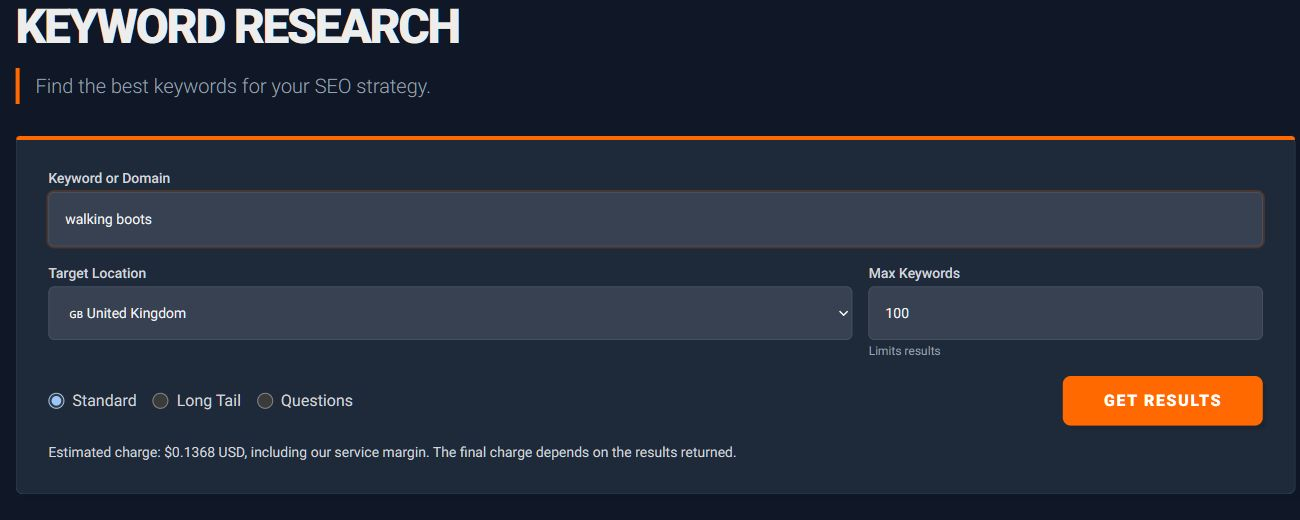
Open the Keywords menu and choose Keyword Research. You only need a starting idea, often called a seed keyword. Choose something closely related to what you offer; “walking boots” is usually a more useful starting point for an outdoor shop than “shopping”.
Using this page, step by step
- Enter your starting phrase in Keyword or Domain. In Target Location, select the country of the people you want to reach. This matters because the same phrase may have different levels of interest in different countries.
- Choose a manageable number under Max Keywords. For a first attempt, a small set is easier to review than hundreds of ideas. Choose Standard for a general starting list, or try Long Tail or Questions for a more specific kind of suggestion. Read the usage estimate, then select Get Results.
- Read the returned phrases before focusing on their numbers. Keep the ones that describe something your business can supply or your website can explain well. Leave out phrases that happen to contain the same words but concern another subject.
- Use the Keyword Suggestions and Keyword Difficulty options in the Keywords menu to continue your investigation. You can then inspect a few chosen phrases in SERP Analysis to see what kinds of pages answer those searches.
A worked example
Imagine that your shop sells boots for country walks. An idea about “waterproof walking boots” may suit a product category, while “how to clean walking boots” could suit a care guide. Both concern boots, but the person searching wants a different kind of help. Your next step is to choose one phrase and look at its current search results.
Understanding what you see
Search volume estimates how often a phrase is searched. It does not predict how many people will visit your page. A smaller, very relevant phrase can be more useful than a popular phrase unrelated to your offer.
CPC describes advertising costs, and advertising competition concerns paid advertisements. Keyword difficulty is a separate estimate of competition in unpaid search results. Use these numbers to help compare ideas, rather than allowing one score to make the decision for you.
Common questions and problems
If the ideas feel too broad, add a detail to your starting phrase, such as a product type or audience. If you receive very few ideas, try a simpler phrase and check the selected country.
If you already have the phrases you want to measure, use Bulk Search Volume. You do not need to discover them again here.